

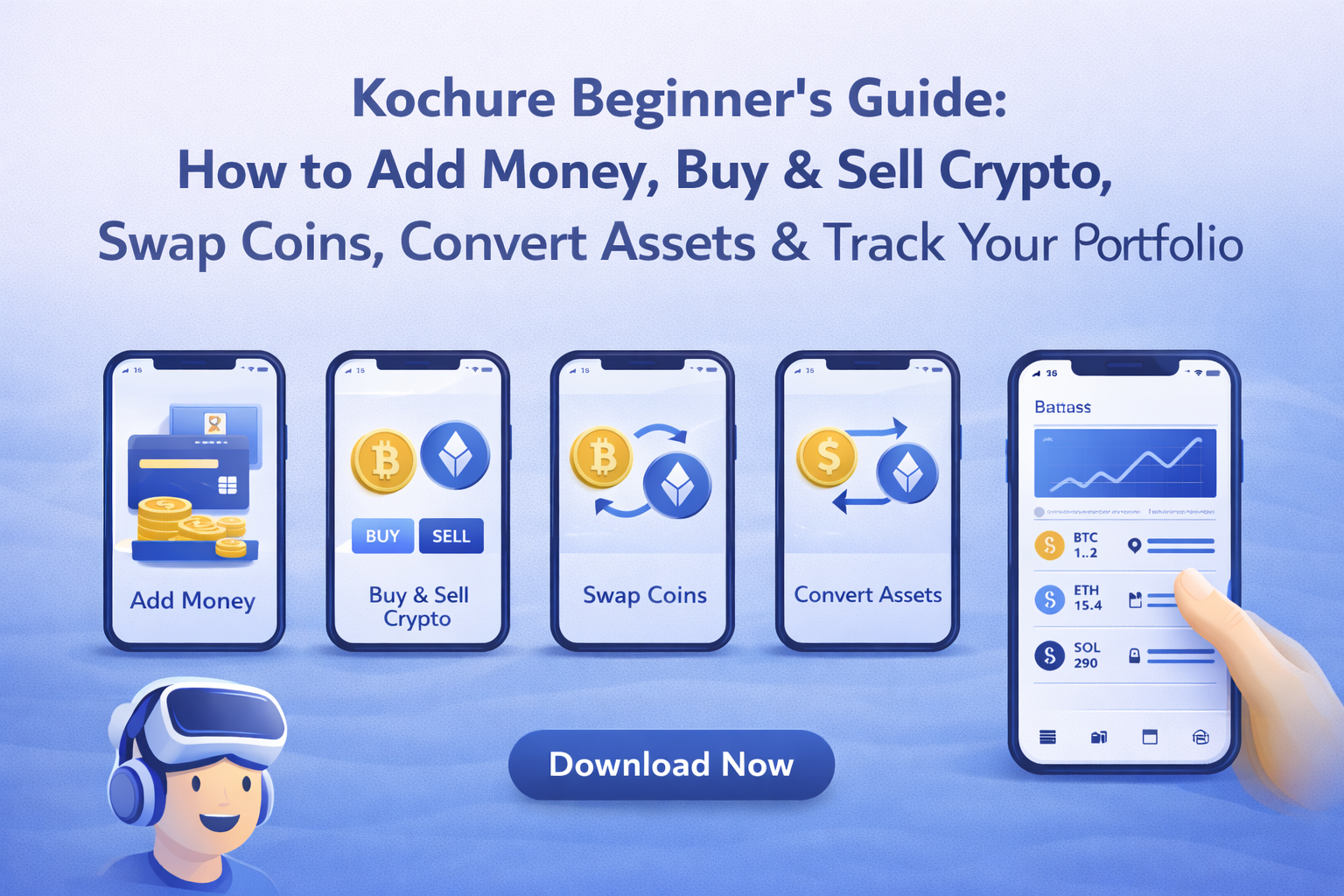
Getting started with cryptocurrency shouldn’t be confusing, slow, or risky. With Kochure, you can deposit Naira in minutes, receive crypto securely, buy and sell instantly, swap coins effortlessly, and monitor your portfolio — all from one streamlined app.
Whether you’re investing for the first time or looking for a smarter way to manage your digital assets, Kochure gives you the tools to move confidently. No complicated steps. No unnecessary delays. Just fast funding, seamless trading, and full control of your money.
In this guide, you’ll learn exactly how to add money, receive crypto, trade efficiently, convert assets, and track your portfolio like a pro — so you can start making informed decisions from day one.
What Is Kochure?
Kochure is a digital asset platform that allows users to:
- Deposit Naira (NGN)
- Receive and store cryptocurrency
- Buy and sell crypto instantly
- Swap coins seamlessly
- Convert crypto to Naira
- Track portfolio performance
Designed for speed and reliability, Kochure eliminates unnecessary complexity so you can focus on growing and managing your digital assets efficiently.
1. How to Add Money on Kochure.
Adding funds is the first step to trading on Kochure. Once your wallet is funded, you can buy crypto instantly and respond to market opportunities in real time.
Deposit Naira (NGN)
To deposit Naira:
- Open the Kochure app.
- Navigate to Add Money.
- Select Naira (₦) or USD ($).
- Enter your preferred deposit amount.
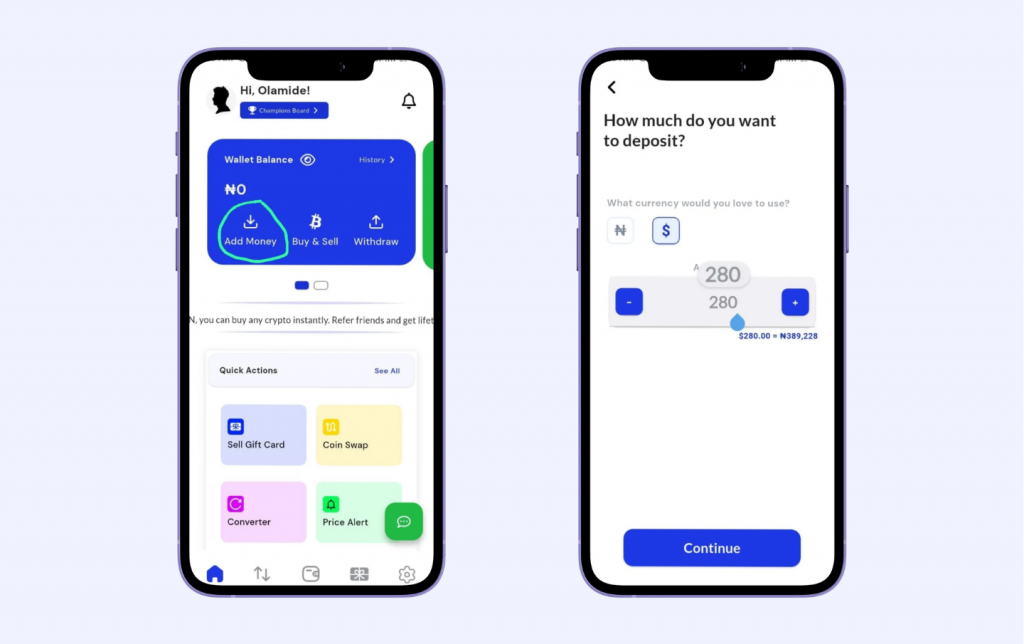
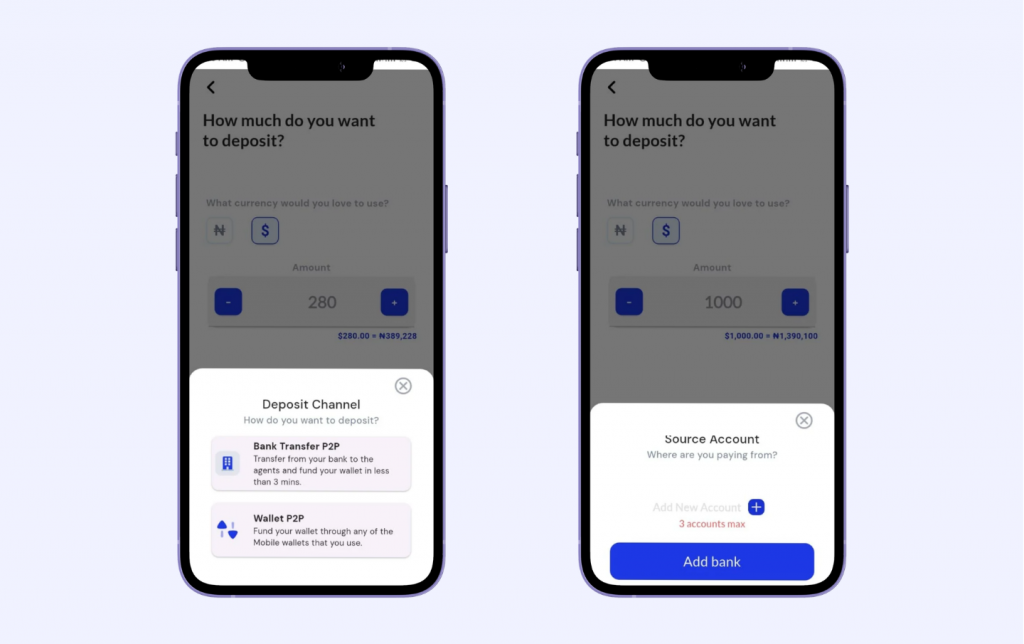
- Choose your deposit channel — Bank Transfer or Wallet P2P.
Understanding the Deposit Channels
– Bank Transfer (Direct Naira Deposit)
This option allows you to fund your Kochure wallet directly from your bank account.
After selecting Bank Transfer,
- Select the blue (+) icon or click on add bank. (Maximum of three account).
- Input your dedicated account number
- Select bank name
- Enter your account number.
You then:
- Log into your banking app
- Transfer the exact amount shown
- Use the correct narration/reference (if provided)
Once payment is received and verified, your wallet is credited automatically.
Best for: Users depositing from Nigerian bank accounts.
Advantage: Fast processing and seamless wallet funding.
Wallet P2P (Peer-to-Peer Deposit)
This option allows you to fund your wallet through a verified merchant or crypto wallet transfer.
Depending on your selection:
For Fiat-to-Crypto P2P:
- You are matched with a verified seller.
- You transfer funds directly to the seller’s bank account.
- Once confirmed, crypto is released to your Kochure wallet.
For Crypto Deposit:
- You receive a wallet address.
- You send crypto from an external wallet.
- After blockchain confirmation, your wallet updates automatically.
Best for: Users buying crypto directly or sending crypto from another wallet.
2. Buy & Sell Crypto Instantly.
The Buy & Sell feature allows you to trade cryptocurrency at competitive market rates.
Buy crypto using your Naira balance
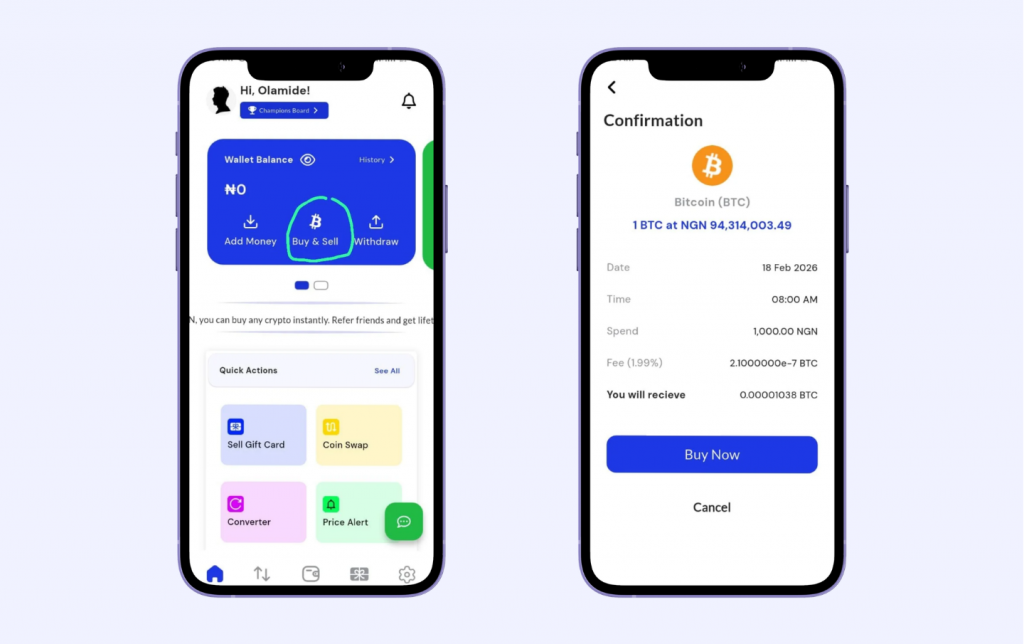
To buy:
- Tap Buy & Sell.
- Select Instant Buy.
- Choose your preferred cryptocurrency.
- Enter the amount you want to purchase, then tap Continue.
- You’ll be redirected to the confirmation page — review the details and tap Buy Now to complete and secure your transaction.
To Sell:
- Tap Buy & Sell.
- Select Instant Sell.
- Choose your preferred cryptocurrency.
- Enter the amount you want to sell, then tap Continue.
- You’ll be redirected to the confirmation page — review the details and tap Buy Now to complete and secure your transaction.
3. Swap any crypto coin easily.
Need to convert one crypto asset to another? The Swap feature makes it fast and seamless.
- Open the app and tap Swap.
- Select the crypto you want to swap from and select the one that you are swapping to.
- Choose the crypto you want to receive.
- Enter the amount.
- Review the transaction details.
- Tap Confirm Swap to complete the transaction.
Your new crypto balance updates instantly after a successful swap — no complicated steps, no delays.
4. Convert Assets Instantly
The Converter feature allows you to quickly calculate the value of one asset in another — before making a trade. It helps you make informed decisions with real-time price visibility.
- Open the app and tap Converter.
- Select the asset you’re converting from.
- Choose the asset you want to convert to (e.g., crypto to Naira or crypto to crypto).
- Enter the amount.
- Instantly view the equivalent value based on the current market rate.
No commitment required — the converter simply shows you the value, so you can plan your trade with confidence before proceeding.
Converter vs Swap: What’s the Difference?
In a crypto app, the Converter and Swap features serve different purposes.
A Converter is a calculation tool. It shows the real-time value of one asset in another, helping you estimate how much you’ll receive — without executing a transaction. Your balance remains unchanged.
A Swap, on the other hand, is a live transaction. It instantly exchanges one cryptocurrency for another, and your wallet balance updates immediately.
In simple terms:
Converter = Check the value.
Swap = Complete the trade.
Got it! Here’s a short, app-focused section on Portfolio for your Kochure guide:
5. Managing Your Portfolio on Kochure.
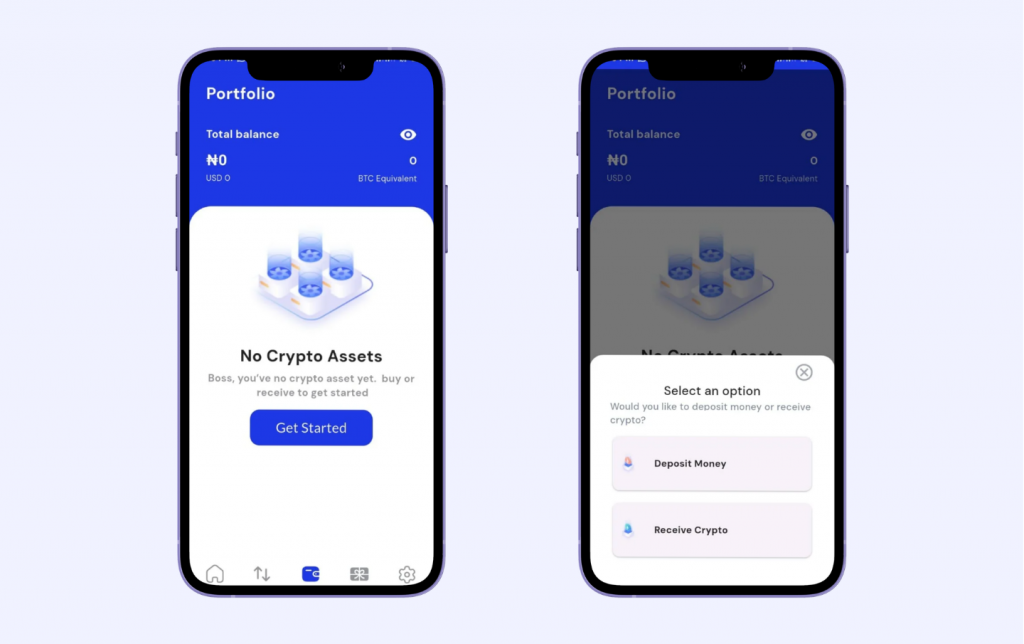
Open the app and go to Portfolio. Here, you can easily manage your funds and track your crypto performance. Click on get started, this bring you to choosing between depositing or receiving crypto.
- Deposit Money – Add funds directly from your bank account to start trading.
- Receive Crypto – This is where you will find your unique crypto address. You share to receive coins safely. Always double-check your address to avoid mistakes.
Your portfolio also lets you track performance over time, showing which assets are gaining or losing value. Use these insights to make smart decisions — whether to buy, sell, or swap
6. Swap Giftcard For Cash In Minutes.
With Kochure, turning your gift cards into usable funds is fast and simple.
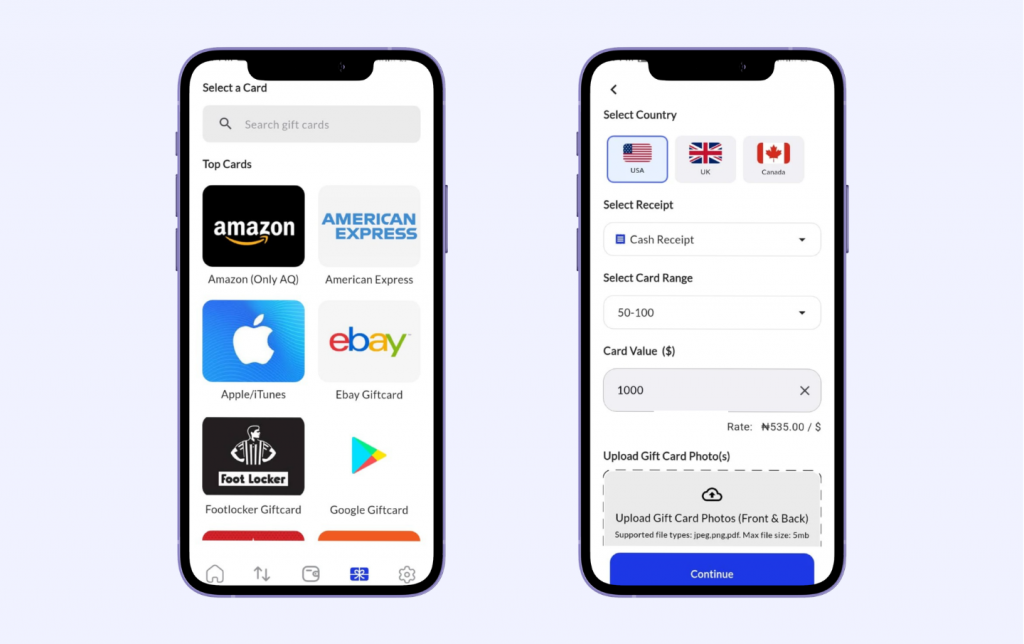
- Open the app and tap Giftcard.
- Select the Topcard that you will like to swap (examples are Amazon, Aple/Itunes).
- Select Country, receipt, card range, card value (Instantly view the card value rate) and card range.
- Upload Gift card photos and click on continue.
Kochure ensures a safe, instant, and hassle-free way to make your gift cards work for you.
Frequently Asked Questions (FAQs)
How do I get my Kochure wallet address?
Navigate to Portfolio → Select the Receive Crypto Option → Copy your wallet address.
Can I deposit Naira instantly?
Yes. Supported payment methods usually reflect within minutes after confirmation.
How long do crypto deposits take?
Crypto deposits depend on blockchain confirmations. This can take a few minutes to up to an hour depending on the network.
Are crypto withdrawals reversible?
No. Blockchain transactions are irreversible. Always verify wallet addresses before confirming.
Can I trade gift cards on Kochure?
Supported gift card services allow you to evaluate rates and complete transactions within the app where available.
Final Thoughts
Understanding how to add money, buy and sell crypto, swap coins, convert assets, and track your portfolio is essential for successful digital asset management.
By using Kochure’s core features strategically, you can deposit Naira, receive cryptocurrency, trade efficiently, and monitor your portfolio — all within one secure ecosystem.